ZFS Boot Mirrors on Proxmox 8 for the Homelab - Part 2
· 13 min readPart 1 covers replacing a failed drive with one of the same size. This part covers the scenario that procedure can’t fix — when both drives in the mirror fail at the same time and you’re doing an emergency recovery. Part 3 covers the planned migration path — downsizing from large HDDs to smaller SSDs with a fresh install and UEFI upgrade, applying the lessons learned here.
That’s what happened to harlan, one of the six nodes in my homelab cluster. Both 500GB HDDs developed simultaneous checksum errors and permanent data corruption. The root cause wasn’t two independent drive deaths — it was a shared failure point, most likely a bad SATA cable or failing controller causing I/O errors that corrupted both sides of the mirror before ZFS could self-heal. This is why I treat shared failure points — cables, controllers, backplanes — as the first thing to investigate when correlated failures appear. Independent drive deaths are statistically rare; shared infrastructure failures are common.
The recovery path is a fresh Proxmox install. The goal is to get the OS back without touching the Ceph OSD drives, then rejoin the cluster and reactivate the OSDs from their existing LVM metadata.
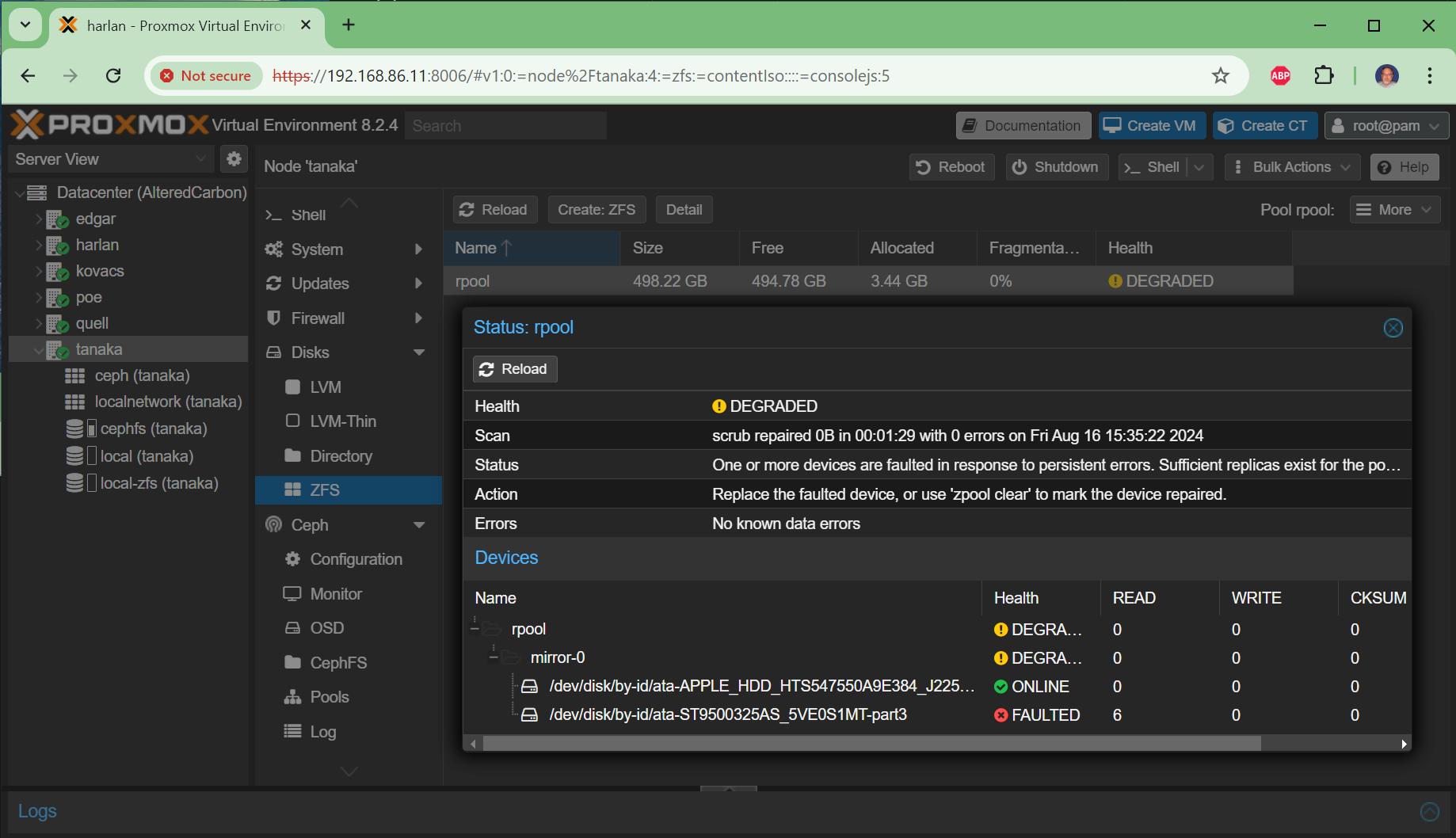
Recognizing the Catastrophic Failure
The first sign was a dpkg error during a routine package install:
dpkg: unrecoverable fatal error, aborting:
loading files list for package 'ssh': cannot open
/var/lib/dpkg/info/ssh.list (Invalid exchange)
Invalid exchange (errno 52) from a filesystem operation means the kernel hit a block it couldn’t read. Running zpool status -v confirmed the worst:
root@harlan:~# zpool status -v
  pool: rpool
 state: DEGRADED
status: Mismatch between pool hostid and system hostid on imported pool.
  scan: resilvered 17.5M in 00:00:08 with 7 errors on Thu Jan 15 06:47:57 2026
config:
        NAME                                        STATE     READ WRITE CKSUM
        rpool                                       DEGRADED     0     0     0
          mirror-0                                  DEGRADED     0     0     0
            ata-ST500DM002-1BD142_Z3TGX1AS-part3    DEGRADED     0     0   226  too many errors
            ata-ST500DM002-1SB10A_ZA45K50E-part3    DEGRADED     0     0  3.14K too many errors

errors: Permanent errors have been detected in the following files:
/var/lib/dpkg/info/ssh.list
...
Both drives show CKSUM errors — 226 and 3,140 respectively. ZFS cannot self-heal when both sides of the mirror are corrupted. The Permanent errors section lists files that are unrecoverable from either disk.
This is not a normal drive failure. When you see high CKSUM counts on both sides of a mirror simultaneously, suspect:
- A bad SATA cable (most common — a loose cable causes CRC errors that corrupt both drives before ZFS notices)
- A failing HBA or SATA controller
- Bad RAM (ECC errors corrupting data in flight)
Check dmesg | grep -E "ata|error" for exception Emask or SATA link down messages. If you see those, you have a physical connection problem, not two independent drive deaths.
The Decision: Fresh Install
Once you have permanent errors on both sides of a ZFS mirror, your options are:
- Attempt repair — only viable if the corruption is limited to non-critical files and the hardware problem is fixed
- Fresh install — the clean path when system files are corrupted
For a Proxmox cluster node with Ceph OSDs, a fresh install is actually less scary than it sounds. The Ceph data lives on separate drives and is completely independent of the OS. The cluster configuration is replicated across all nodes. What you need to preserve is the node’s identity so it can rejoin the cluster and reclaim its OSDs.
What to Back Up Before the Drives Die Completely
Ideally you run these backups while the node is still limping along. If the node is already dead, most of this can be reconstructed from other cluster nodes — but having it locally is faster and safer.
# Create backup directory on shared CephFS storage
mkdir -p /mnt/pve/cephfs/backups/harlan/

# Capture the binary hostid — critical for ZFS pool reimport
hostid > /mnt/pve/cephfs/backups/harlan/harlan-hostid.txt

# Bundle the cluster identity files
tar -cvzf /mnt/pve/cephfs/backups/harlan/harlan_backup_$(date +%Y-%m-%d).tar.gz \
  /etc/network/interfaces \
  /etc/hosts \
  /etc/resolv.conf \
  /etc/hostname \
  /etc/subuid \
  /etc/subgid \
  /etc/pve/ceph.conf \
  /etc/pve/storage.cfg \
  /etc/corosync/corosync.conf \
  /etc/corosync/authkey \
  /etc/ceph/ceph.client.admin.keyring \
  /var/lib/ceph/bootstrap-osd/ceph.keyring \
  /var/lib/pve-cluster/config.db

# Capture OSD-to-disk mapping
ceph-volume lvm list > /mnt/pve/cephfs/backups/harlan/ceph_lvm_layout.txt
pvs > /mnt/pve/cephfs/backups/harlan/ceph_pv_layout.txt

# Capture /var/lib/ceph/osd symlinks (block device paths)
tar -cvzf /mnt/pve/cephfs/backups/harlan/ceph_osd_var_lib.tar.gz \
  /var/lib/ceph/osd/

# Capture any kernel boot quirks (important for USB OSD drives)
cp /etc/default/grub.d/*.cfg \
  /mnt/pve/cephfs/backups/harlan/ 2>/dev/null || true

# List manually installed packages for post-install restoration
apt-mark showmanual > /mnt/pve/cephfs/backups/harlan/harlan-apt-mark-showmanual.txt
Why Each File Matters
| File | Why it matters |
|---|---|
hostid |
ZFS records the hostid that imported the pool. Mismatch causes warnings and can prevent clean import |
corosync/authkey |
Without this, the node cannot rejoin the cluster — it’s the shared secret |
corosync/corosync.conf |
Node list, cluster name, config version — needed to reconstruct if cluster is also degraded |
ceph.client.admin.keyring |
Ceph admin authentication — needed to run ceph commands post-install |
bootstrap-osd/ceph.keyring |
Required for ceph-volume lvm activate to authenticate with the cluster |
ceph_lvm_layout.txt |
Maps OSD IDs to physical devices — your recovery map if activate --all fails |
subuid / subgid |
UID/GID mappings for unprivileged LXC containers — missing this breaks container startup |
grub.d/*.cfg |
USB storage quirks — without these, USB-attached OSD drives may not be accessible at boot |
The USB Quirks File
harlan’s Ceph OSDs are on Seagate USB3 portable drives. Without a kernel parameter to disable UAS (USB Attached SCSI) for these specific drives, the kernel’s UAS driver causes I/O errors. The quirks file looked like this:
# /etc/default/grub.d/usb-quirks.cfg
GRUB_CMDLINE_LINUX="$GRUB_CMDLINE_LINUX usb_storage.quirks=0bc2:ac2b:,0bc2:2344:,0bc2:ac41:,0bc2:ab9a:"
The 0bc2:* vendor IDs are Seagate’s USB bridge chips. If your OSDs are on USB drives, check lsusb and dmesg | grep -i uas to identify whether you need this. Without it, the drives may appear but throw I/O errors under load.
Pause the Ceph Cluster
Before taking the node down, tell Ceph not to rebalance data while the node is offline. Run this from any healthy cluster node:
ceph osd set noout
ceph osd set nobackfill
This prevents the cluster from treating harlan’s OSDs as permanently lost and starting a potentially hours-long rebalance. You’ll unset these flags after the node rejoins.
The Fresh Install
Boot from the Proxmox installer USB. The key decisions:
- Target disks: Select only the new boot SSDs. Do not touch the OSD drives or the WAL SSD.
- Filesystem: ZFS RAID1 (mirror)
- Hostname: Use the exact same hostname (
harlan) and IP (192.168.86.11) - Boot mode: harlan was reinstalled in Legacy BIOS mode to match the existing cluster. See the note below on UEFI.
The installer will create a fresh rpool on the new SSDs. The OSD drives are untouched.
Legacy BIOS vs UEFI
harlan was kept on Legacy BIOS for the reinstall because the other cluster nodes are also Legacy BIOS. Mixing boot modes in a cluster is fine — each node boots independently — but switching a live node from Legacy to UEFI requires repartitioning the boot disks, which adds risk during an already stressful recovery.
The practical rule: keep the same boot mode as the original install for an emergency recovery. Switch to UEFI on a planned fresh install when you have time to do it deliberately — see Part 3 for the planned migration path that includes the UEFI upgrade.
Post-Install Identity Restoration
Once the fresh install is up and you can SSH in, restore the node’s identity before joining the cluster.
1. Restore the HostID
# Set the hostid to match the original
zgenhostid a8c00b56
Verify it took:
hostid
# should output: a8c00b56
Without this step, ZFS will import the rpool with a hostid mismatch warning. The pool still works, but the warning persists across reboots and can cause confusion. More importantly, if you ever need to import the pool on another node for recovery, the mismatch can complicate things.
2. Restore Network Configuration
# Copy back from the backup tarball
tar -xvzf /path/to/harlan_backup_2026-01-15.tar.gz \
  -C / \
  etc/network/interfaces \
  etc/hosts \
  etc/resolv.conf
Verify the interfaces match what the installer configured. The installer may have set up the bridge correctly already if you used the same hostname and IP — but confirm vmbr0 and vmbr1 (SAN network) are both present.
3. Restore LXC UID/GID Mappings
tar -xvzf /path/to/harlan_backup_2026-01-15.tar.gz \
  -C / \
  etc/subuid \
  etc/subgid
If you skip this, unprivileged LXC containers will fail to start with permission errors. The Jellyfin LXC on harlan hit exactly this problem — the container started but couldn’t write to its data directories because the UID mapping was wrong.
4. Restore USB Boot Quirks
cp /path/to/etc-default-grub.d-usb-quirks.cfg \
  /etc/default/grub.d/usb-quirks.cfg

update-grub
This must be done before the OSDs are activated, or the USB drives may not be accessible.
5. Run the Proxmox Post-Install Script (Optional)
The Proxmox community post-install script fixes the no-subscription repository warning, disables the enterprise repo, and applies CPU microcode updates:
bash -c "$(wget -qLO - https://github.com/community-scripts/ProxmoxVE/raw/main/misc/post-pve-install.sh)"
Rejoin the Cluster
pvecm add 192.168.86.12
Use the IP of any healthy cluster node. You’ll be prompted for the root password of that node.
The /etc/pve Mount Issue
After pvecm add, Proxmox mounts the cluster filesystem at /etc/pve. If the directory already has files from the fresh install (it will), you may see:
mount: /etc/pve: special device pmxcfs already mounted or /etc/pve busy.
The fix:
# Move the local pve config out of the way
mv /etc/pve /etc/pve.local-backup

# Let the cluster mount take over
systemctl restart pve-cluster

# Merge any node-specific config from the backup if needed
# (most config is cluster-wide and will come from pmxcfs)
Once the cluster filesystem is mounted, the node’s configuration — VM/LXC definitions, storage config, user permissions — is all replicated from the cluster. You don’t need to restore config.db manually unless the entire cluster was down.
Verify Cluster Membership
pvecm status
harlan should appear in the node list with quorum. If the cluster had 6 nodes before and now shows 6 again, you’re in good shape.
Reactivate the Ceph OSDs
The OSD data is intact on the drives. Ceph just needs to be told to activate them on the new OS install.
ceph-volume lvm activate --all
This scans the LVM metadata on all drives, finds the Ceph OSD volumes, and starts the OSD daemons. For harlan, this brought back osd.0, osd.3, and osd.6.
Watch the OSD status from any cluster node:
ceph osd tree
The OSDs should transition from down to up. They’ll stay in because the cluster map still has them — they were never removed, just offline.
If activate --all Fails
If the automatic activation doesn’t find the OSDs, use the LVM layout backup to activate them manually:
# From ceph_lvm_layout.txt, find the OSD fsid and activate by ID
ceph-volume lvm activate --bluestore <osd-id> <osd-fsid>

# Example for osd.0:
ceph-volume lvm activate --bluestore 0 3f49e837-c410-4025-bcf5-af5e6cd2c173
The OSD fsids are in the ceph_lvm_layout.txt backup under osd fsid.
Unpause the Cluster
Once harlan’s OSDs are up and the cluster health is HEALTH_OK (or HEALTH_WARN with only expected warnings):
ceph osd unset noout
ceph osd unset nobackfill

# Archive any crash reports from the outage
ceph crash archive-all
Verify the New Boot Mirror
root@harlan:~# zpool status -v
  pool: rpool
 state: ONLINE
  scan: scrub repaired 0B in 00:00:12 with 0 errors on Sun Apr 12 00:24:13 2026
config:
        NAME                                STATE     READ WRITE CKSUM
        rpool                               ONLINE       0     0     0
          mirror-0                          ONLINE       0     0     0
            ata-SSD_YS202010015363AA-part3  ONLINE       0     0     0
            ata-SSD_YS202010025083AA-part3  ONLINE       0     0     0

errors: No known data errors

root@harlan:~# proxmox-boot-tool status
System currently booted with legacy bios
D91B-B982 is configured with: grub (versions: 6.8.12-18-pve)
D91C-8216 is configured with: grub (versions: 6.8.12-18-pve)
Both SSDs listed, both registered with grub, no errors. The recovery is complete.
The Residual HostID Warning
After the fresh install and zgenhostid, harlan still shows this on zpool status:
status: Mismatch between pool hostid and system hostid on imported pool.
This is a cosmetic warning from the initial boot before zgenhostid was run. It clears permanently after a clean export and reimport of the pool, which requires a live migration of any running VMs/LXCs off the node first. It does not affect pool operation or data integrity. You can leave it or clear it during a future maintenance window with:
# Migrate all VMs/LXCs off harlan first, then:
zpool export rpool
zpool import rpool
The Backup Checklist
Based on the harlan recovery, here’s the minimum backup set every Proxmox Ceph node should have on shared storage:
#!/bin/bash
# Run on each node, store to /mnt/pve/cephfs/backups/<nodename>/
NODE=$(hostname)
BACKUP_DIR="/mnt/pve/cephfs/backups/${NODE}"
mkdir -p "${BACKUP_DIR}"

hostid > "${BACKUP_DIR}/${NODE}-hostid.txt"

tar -czf "${BACKUP_DIR}/${NODE}_backup_$(date +%Y-%m-%d).tar.gz" \
  /etc/network/interfaces \
  /etc/hosts \
  /etc/resolv.conf \
  /etc/hostname \
  /etc/subuid \
  /etc/subgid \
  /etc/pve/ceph.conf \
  /etc/pve/storage.cfg \
  /etc/corosync/corosync.conf \
  /etc/corosync/authkey \
  /etc/ceph/ceph.client.admin.keyring \
  /var/lib/ceph/bootstrap-osd/ceph.keyring \
  /var/lib/pve-cluster/config.db \
  2>/dev/null

ceph-volume lvm list > "${BACKUP_DIR}/ceph_lvm_layout.txt"
pvs > "${BACKUP_DIR}/ceph_pv_layout.txt"
tar -czf "${BACKUP_DIR}/ceph_osd_var_lib.tar.gz" /var/lib/ceph/osd/
cp /etc/default/grub.d/*.cfg "${BACKUP_DIR}/" 2>/dev/null || true
apt-mark showmanual > "${BACKUP_DIR}/${NODE}-apt-mark-showmanual.txt"
Run this as a cron job or after any significant configuration change. The backup is small (under 50KB for most nodes) and the CephFS storage is replicated across the cluster.
Related Articles
- ZFS Boot Mirrors on Proxmox 8 - Part 1 — Same-size drive replacement
- ZFS Boot Mirrors on Proxmox 8 - Part 3 — Planned migration to smaller SSDs with fresh install and UEFI upgrade
- Monitoring ZFS Boot Mirror Health in Proxmox 8 Clusters — SMART monitoring and alerting
- Proxmox & Ceph Homelab Guide — All my Proxmox and Ceph articles in one place