Testing a Machine-Readable Resume Against ATS Systems and AI Agents
· 9 min readBuilding a machine-readable resume view with JSON-LD and semantic HTML is the easy part. Validating that it actually works — that Google indexes the structured data, that ATS systems can parse the PDF exports, and that AI agents extract accurate information from the semantic markup — requires testing against real systems with different parsing pipelines.
This is the validation phase for the /resume/machine/ view I built during the resume site rebuild. The view embeds Schema.org structured data using both JSON-LD blocks and microdata attributes. But structured data that passes a syntax validator is not the same as structured data that produces results in the real world.
The Two Audiences
A critical distinction that took me too long to internalize: ATS systems and the machine view serve different audiences through different channels.
| Channel | Consumer | Input Format | What They Parse |
|---|---|---|---|
| Job application upload | ATS (Greenhouse, Lever, Workday) | PDF or DOCX | Text extraction → NER → structured fields |
| Web URL | Google, AI agents, recruiters | HTML + JSON-LD | Structured data, semantic markup, visible content |
ATS systems never see your website. They parse the PDF or DOCX you upload through their application portal. The machine view at /resume/machine/ serves a completely different set of consumers: Google’s structured data indexer (for rich results), AI recruiting agents that browse URLs, and technical recruiters who view source.
Both need to be tested independently because they have different failure modes.
Validation Layer 1: Structured Data (Google)
Google Rich Results Test
The primary validator for JSON-LD structured data intended for Google Search.
- URL: search.google.com/test/rich-results
- Input:
https://mcgarrah.org/resume/machine/ - What it validates: JSON-LD syntax, Schema.org type correctness, required properties for rich result eligibility
My initial submission flagged ScholarlyArticle warnings in the publications section — the type requires headline and image properties that I hadn’t included. After adding <meta itemprop="headline"> and <meta itemprop="image"> tags, the warnings resolved.
Key learning: Google’s validator is strict about properties it considers “recommended” for types that are eligible for rich results. Schema.org itself is more permissive — a property can be valid Schema.org but still produce a Google warning if Google has specific expectations for that type.
Schema Markup Validator
- URL: validator.schema.org
- Input: paste URL or raw HTML
- What it validates: Schema.org vocabulary correctness, nesting, property value types
More permissive than Google’s tool because it validates against the full Schema.org specification, not just the subset Google supports for rich results. Useful for catching structural errors that Google’s tool might not flag.
Google Search Console
After the page is live and indexed:
- Check Enhancements → Unparsable structured data for any indexing failures
- Check Performance → filter by page to see if rich results are appearing
- Monitor over time — structured data issues can appear days after indexing
Validation Layer 2: ATS Resume Parsers
ATS systems parse uploaded documents through a pipeline:
flowchart LR
    A[Text Extraction] --> B[Tokenization]
    B --> C[Section Detection]
    C --> D[Named Entity Recognition]
    D --> E[Structured Output]
Each major system implements this differently, which means a resume that parses perfectly in Greenhouse might lose data in Workday.
Testing Tools
| Tool | What It Tests | Approach |
|---|---|---|
| Jobscan | Keyword match + parse fidelity against a specific job description | Upload PDF + paste job description, get match score |
| Resume Worded | ATS score + section detection + keyword gaps | Upload PDF, get structural analysis |
| SkillSyncer | Keyword matching + formatting issues | Upload PDF + job description |
| Teal | ATS score + keyword tracking across multiple applications | Upload PDF, track over time |
Testing Methodology
- Export the brief PDF (
McGarrah-Resume-brief.pdf) — this is what I’d actually submit to jobs - Select 3–5 real job descriptions at target companies (ideally ones using different ATS platforms)
- Upload to each checker tool with the job description
- Record for each:
- Parse success: Did it extract name, contact, all jobs, all dates correctly?
- Section detection: Did it identify Education, Experience, Skills as separate sections?
- Keyword match score: What percentage of job description keywords appear in the resume?
- Formatting warnings: Any structural issues that could cause parse failures?
Direct ATS Upload Testing
The gold standard is submitting through actual ATS portals and checking the parsed result:
- Greenhouse: Look for “Powered by Greenhouse” in job posting footers. After applying, some portals show the parsed profile.
- Lever: URLs contain
jobs.lever.co. Lever shows a parsed preview during application. - Workday: Most Fortune 500 companies. The application flow shows parsed fields you can verify.
- iCIMS: Common in healthcare, finance, government sectors.
This is time-consuming but reveals real parsing failures that no simulator can catch. The parsed output shows exactly what the recruiter sees — and where data was lost or misassigned.
Common ATS Parse Failures
Based on research into how these systems work:
- Multi-column layouts break section detection (my resume is single-column — safe)
- Tables for formatting confuse text extraction order (not used)
- Headers/footers with contact info get missed by some parsers (contact is in the body)
- Non-standard section headings prevent section classification (I use standard: “Experience”, “Education”, “Skills”)
- Dates not adjacent to job titles cause incorrect date-role associations (mine are in the same
<div>) - PDF generated from complex CSS can produce garbled text extraction (XeLaTeX produces clean text layers)
Validation Layer 3: AI Agent Parsing
This is the newest validation layer — and the one the /resume/machine/ view is specifically designed for.
Test Protocol
Feed the machine view URL to major AI systems and ask them to extract structured information:
Prompt: “Extract all jobs with company names, titles, dates, and key accomplishments from this page: https://mcgarrah.org/resume/machine/”
Test against:
- Claude (Anthropic)
- ChatGPT (OpenAI)
- Gemini (Google)
Evaluate:
- Completeness: Did it find all 27 experience entries?
- Accuracy: Are dates, titles, and company names correct?
- Association: Are skills correctly linked to the right roles?
- Structured output: Can it produce a clean JSON representation?
Why This Matters
AI recruiting agents are emerging rapidly. Tools like HireVue, Eightfold, and Beamery use AI to match candidates to roles. LinkedIn’s recruiter tools increasingly use AI to surface candidates. Having a machine-readable view that AI systems can parse accurately is not a future concern — it is a current competitive advantage.
The JSON-LD in the machine view serves dual purpose: Google structured data for SEO, and grounding context for AI agents. A recruiter’s AI assistant that can accurately extract “5 years of EKS experience across 20+ clusters” from structured data will surface that candidate over one whose resume requires PDF text extraction and NLP inference.
Results
Export Inventory
Each export serves a different use case and needs independent validation:
| Export | URL | Use Case | ATS Test? | AI Test? |
|---|---|---|---|---|
| Brief PDF (XeLaTeX, 5 pages) | /resume/downloads/McGarrah-Resume-brief.pdf |
Standard job applications | ✅ Primary | — |
| Ultra-Brief PDF (XeLaTeX, 2 pages) | /resume/downloads/McGarrah-Resume-ultra-brief.pdf |
Job boards with length limits | ✅ | — |
| Long PDF (XeLaTeX, 34 pages) | /resume/downloads/McGarrah-Resume-long.pdf |
Deep-dive readers, reference | Optional | — |
| DOCX (Pandoc) | /resume/downloads/McGarrah-Resume.docx |
ATS systems that prefer Word | ✅ | — |
| Pandoc PDF | /resume/downloads/McGarrah-Resume.pdf |
Legacy/fallback | Optional | — |
| Machine View (HTML) | /resume/machine/ |
Google, AI agents, recruiters | — | ✅ Primary |
Structured Data Validation
All three validators show clean results:
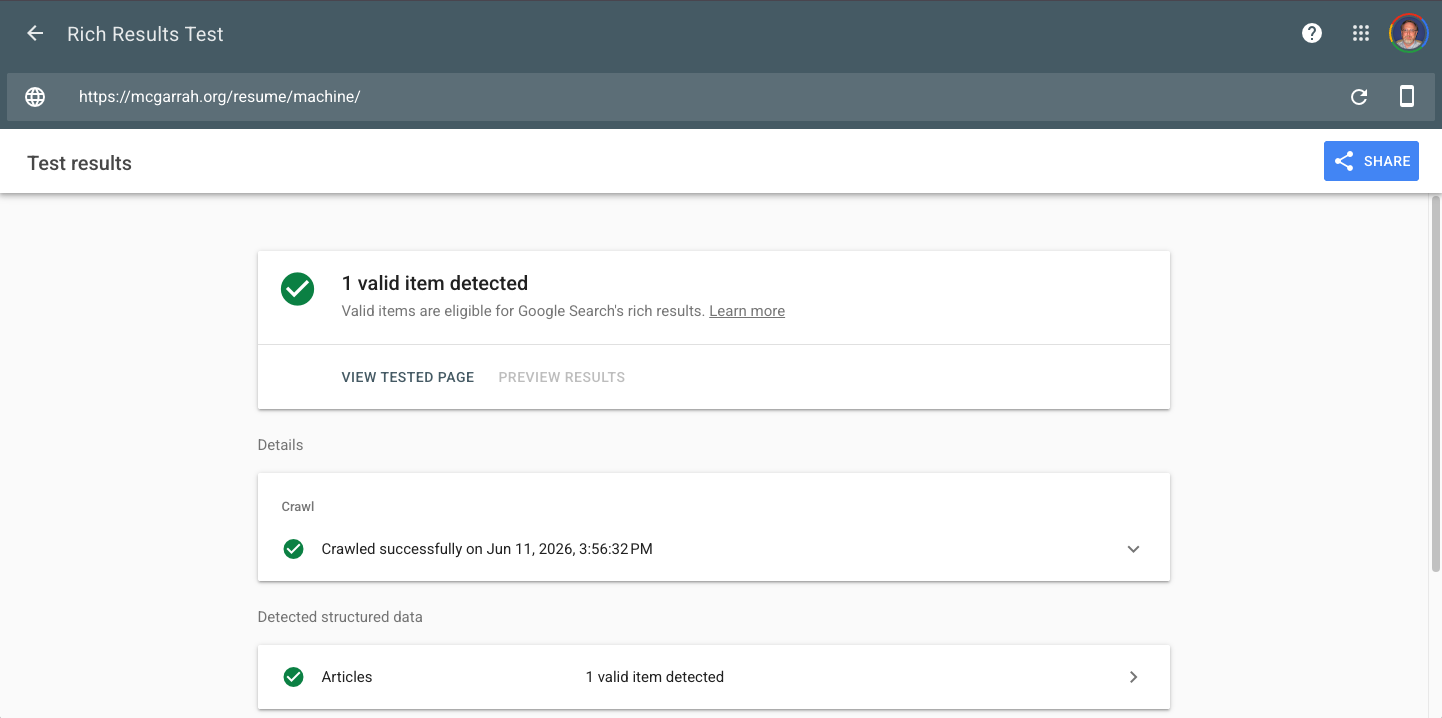
Google Rich Results Test — /resume/machine/ validates correctly after the 2026-05-09 content update.
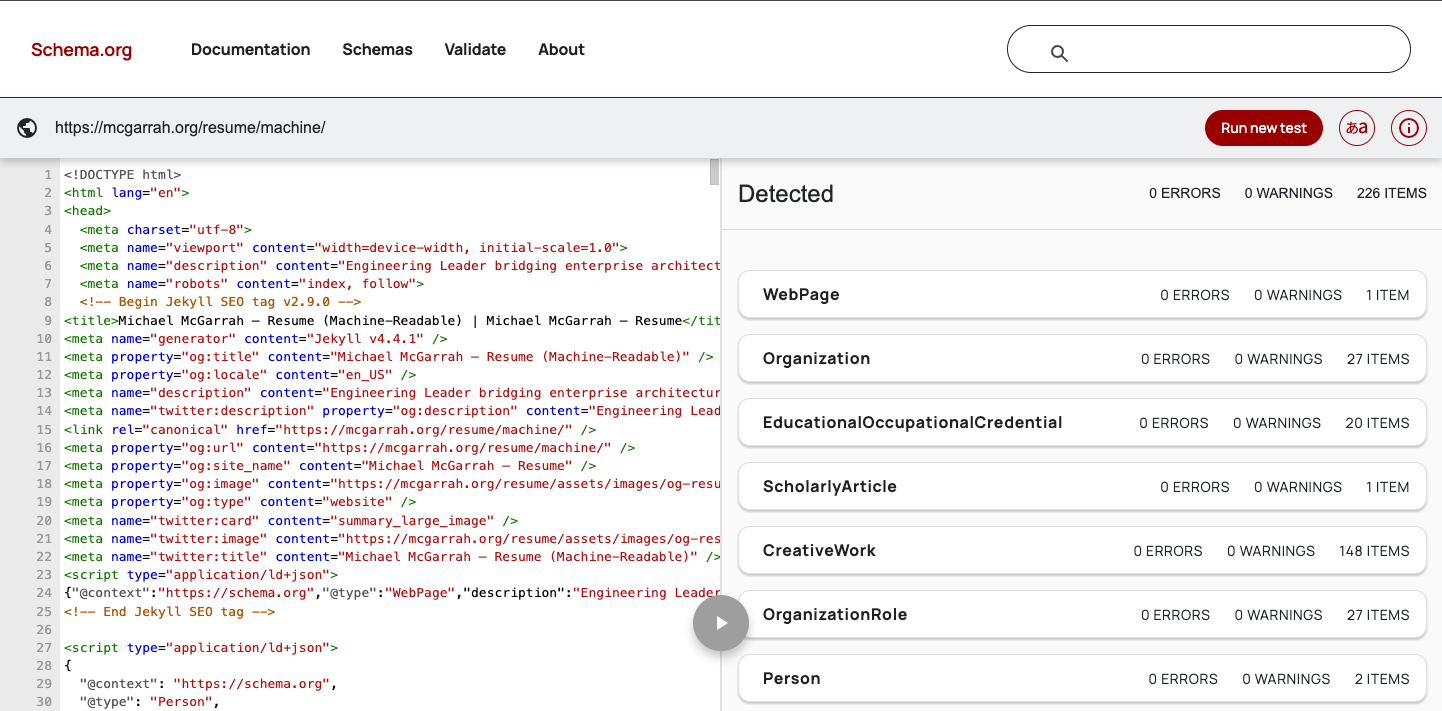
Schema.org Markup Validator — vocabulary and nesting confirmed for /resume/machine/.
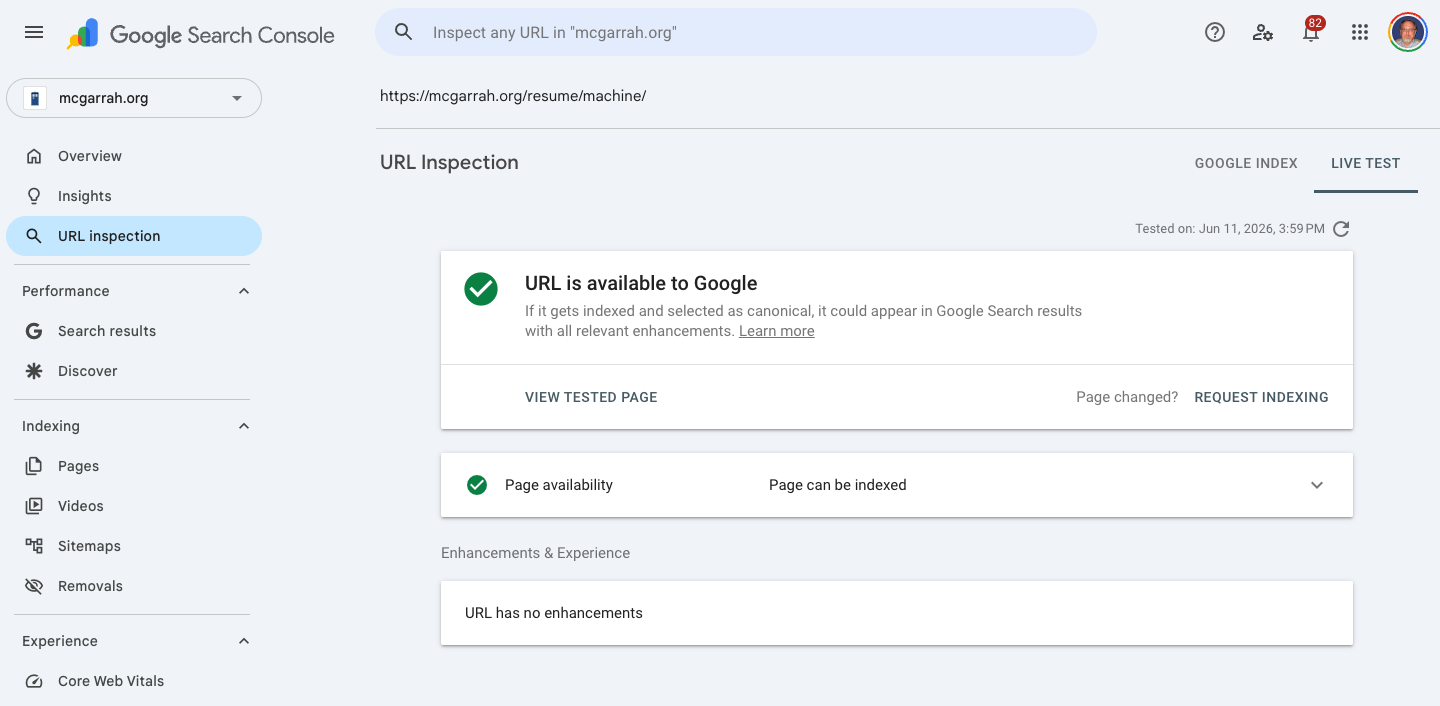
Google Search Console — structured data indexed without errors, rich results appearing.
ATS Parse Testing (PDF/DOCX uploads)
Uploading the brief PDF and DOCX exports to ATS simulation tools is a good way to verify parse fidelity before doing it for real. I still plan to submit to a couple of companies that have resume import mechanisms and observe how the parsed output compares to what I intended — those real submissions will be updated here once I have them to report on. For now, I ran the exports through a few of the free (and free-with-login) simulators.
Free ATS testing tools (no job application required):
- OwlApply ATS Scanner — Free, no signup, checks formatting and keyword coverage against ATS criteria
- Hireflow — Upload and see how an ATS reads your file, no account required
They all came back with minor issues or inflated non-issues. Two takeaways were genuinely worth acting on: use regular characters instead of symbols in the text to avoid parsing issues, and use the same date format across every section.
Mostly, though, these tools are looking to sell you something and flag faults that are not faults.
AI Agent Extraction (Machine View)
I fed each major AI system the same prompt against the machine view URL:
“Please parse my resume at https://mcgarrah.org/resume/machine/ and extract the useful ATS information with a summary.”
Claude (Anthropic): Took the longest to respond (“A bit longer, thanks for your patience…” appeared for several minutes), but produced the most comprehensive summary. It found the most positions and correctly distinguished between full-time primary roles and part-time/concurrent/advisory roles — a nuance the others missed.
ChatGPT (OpenAI): Responded faster than Claude but still took some time. Good parse, but clipped the results to the last 10 years as a typical ATS would. Produced a solid candidate summary and did the best job of framing my candidacy in context.
Gemini (Google): Responded almost immediately. Least aware of career history older than 10 years and over-focused on the current role at Envestnet.
Verdict: Claude produced the best structured extraction by far. ChatGPT and Gemini performed adequately, with ChatGPT slightly ahead in synthesizing a candidate narrative. All three successfully parsed the JSON-LD and semantic markup — the machine view works as intended.
Cross-Format Consistency
The exports are intentionally different — each optimized for a specific audience and level of detail. The brief PDF targets ATS keyword matching, the ultra-brief targets job boards with length constraints, and the machine view targets AI agents and Google. What must remain consistent across all formats: position titles, company names, date ranges, and credential details. The #anchor links in the brief exports that point back to the full resume view also need validation to ensure they resolve correctly after content updates.
The Broader Point
Most resume advice focuses on keywords and formatting — tactical optimizations for a specific ATS. That matters, but it is solving yesterday’s problem. The systems that will matter in 2027 are AI agents that understand semantic structure, not keyword matchers that count string occurrences.
Building a machine-readable view with proper Schema.org markup is an investment in the direction hiring technology is moving. ATS keyword matching is table stakes. Semantic structure that AI agents can reason about is the differentiator.
Related Posts
- Rebuilding My Resume Site From the Ground Up — The rebuild that created the machine view
- Caddy Reverse Proxy for Local Multi-Site Jekyll Development — Local development tooling for the resume site