Thinkpad T480 WWAN SSD
· 6 min readAdding another SSD Drive
In my eternal tinkering with my Lenovo Thinkpad T480s, I have continued the trend of adding new features. So earlier, in A new to me but old laptop and New Laptop update, I threw out a bunch of enhancement options. Some of those I’ve done and some I left on the backlog as things that just cost too much on my metric of usefulness per dollar. The WWAN SSD for extra storage was one of those that just seemed like a bad bang-for-the-buck for storage. I also like the option to add a SIM card and have cellular network available in case I have to go back to consulting on the road.
So I found a way I thought to get the price to value down quite a bit. Or at least expand the options for the SSD drives to expand cost options. I also hit some frustration when downloading LLM Models and filling up large portions of my boot drive with those. My goal was to separate those and other models onto a data volume. Using the large SD Card Slot with a 500Gb or 1Tb SD card works but seemed slow.
So the WWAN M.2 slot on the T480 is a 2242 (42mm) B+M keyed PCIe slot. This means you need two notches in the right place on your card being inserted and it has to be 42mm long. Some folks have done crazy stuff like use hacksaws to cut out pieces of M keyed M.2 drives and/or solder wires across the traces for power. I am no where that adventureous or crazy.
Here is a picture of the M vs B+M keyed edges to get an idea of what I am talking about.

There is a relatively cheap converter to take a M to a B+M key that only adds one unit length, about 12mm, to the length of the disk. So I bought a 2230mm 1Tb SSD that was at my price point and added $10 for the M to B+M key converter.
Sadly, after reviewing current prices and writing this up, I could have picked up a B+M keyed drive very close to the same price now. But when I purchased, there were not many B+M keyed disks for less than $100 USD on Amazon. So the world has moved on and prices have come down since I bought this. So buy beware and YMMV (your mileage my vary) when doing this.
Here is what I ended up installing into my Thinkpad WWAN slot and it worked on the first try.
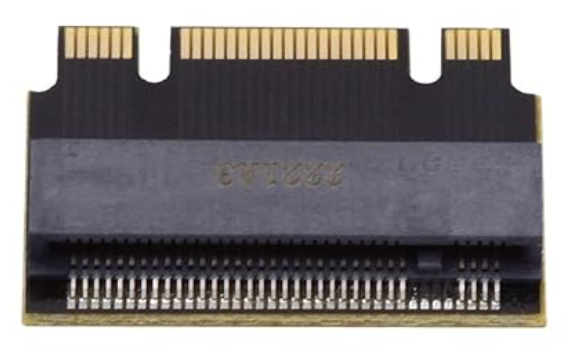
This is a larger picture what makes this whole thing work.

I have not tried booting from it and no major performance testing but it seems to work for what I needed. I wanted separate larger data volume for my LLM models separate from by OS and boot drive. I may at somepoint upgrade to a 2Tb or later drive at some later date but this is making my world better as it is right now.